
Music Labeler is a powerful tool that allows you to transform your music library into an efficient, user-friendly database. Follow the instructions below to learn how to set up Music Labeler.
Step 1:
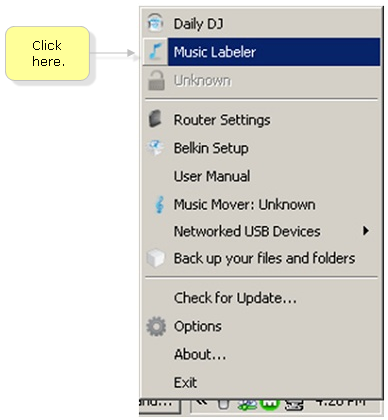
Access the Music Labeler from the Belkin Tray Menu (Windows) or Menu Bar (Mac) by clicking the Belkin Router Manager icon (right-click for Windows).

Step 2:
Click Music Labeler.
Step 3:
You have three (3) options for using Music Labeler:
-
Identify music in your iTunes library by clicking Administrator's iTunes library.

-
Identify music in your Windows Media library by clicking Administrator's Windows Media Library.

-
Identify music in personal libraries stored on any drive connected to your computer by clicking Choose Folder.

NOTE: The library you select will also appear in the Daily DJ application.
Step 4:
Select your desired library and click Ok.

NOTE: The songs in your library will be scanned, processed, and labeled, which can take several minutes, depending on the number of songs in your library.



