Premium accessories for iPhone 18. Shop now

https://www.belkin.com/p/thunderbolt-4-dock/INC030ttSGY.html
Connect
Thunderbolt 4 Dock
SKU: INC030ttSGY
$299.99


Fast and free shipping

30-Day money back guarantee

24/7 Customer support
Connect
Thunderbolt 4 Dock
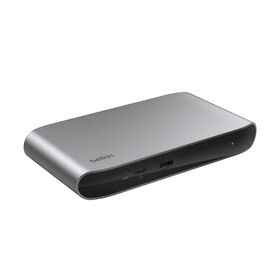
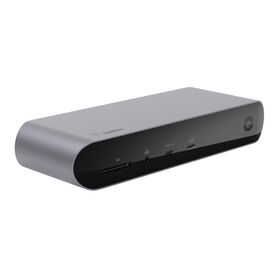
Transform your laptop into a fully functional workstation with a dock that supports bandwidth speeds up to 40Gbps, triple displays up to 4K at 60Hz*, and up to 96W Power Delivery to your host device. Perfect for both creative professionals and everyday users, enjoy 14 ports to expand your laptop's capabilities for video, data, charging, and Ethernet.
$299.99
- In Stock
- Triple UHD displays up to 4K at 60Hz* with clear definition and refresh rate
- Up to 96W Power Delivery to charge your laptop and other devices simultaneously
- Fastest speeds for data transfer and high-quality video up to 40Gbps
- 2.5Gb Ethernet port for hardwired, reliable network connection
- Daisy-chain up to 6 Thunderbolt devices with tidier setup
- Expand your laptop’s capabilities with one USB-C connection featuring 14 ports
- Thunderbolt™ 4 Dock
- PSU 150W with 3.3 ft./1m power cord
- 3.3ft/1m Thunderbolt™ 4 Cable
Compatible with USB-C enabled devices such as laptops, tablets, smartphones and Thunderbolt™5, Thunderbolt™4, Thunderbolt™3 ports. Supports Windows, Mac and Chrome OS.
- Galaxy Book5 Pro 14"
- Galaxy Book6 Pro 14"
- Galaxy Book6 Pro 16"
- Galaxy Book6 Ultra 16"
- Galaxy Book6 Enterprise 14"
- Galaxy Book6 Enterprise 16"
Inputs
- Thunderbolt™
- USB-C
- USB-A
- HDMI
- DisplayPort
- Ethernet
- Audio In/Out
- SD
- MicroSD
Integrated/Included Cable Length
- 3.3 ft./1m
Dimensions (LxWxH)
- 8.85 in. L x 3.39 in. W x 1.06 in. H
Ports
- Thunderbolt™ 4 40Gbps, 15W
- Thunderbolt™ 4 96W PD (to host)
- USB-C 10Gbps (support BC1.2), 30W
- 2x USB-A 10Gbps (support BC1.2)
- 2x USB-A 5Gbps
- 2x DP1.4 supports up to 8K30Hz
- HDMI 2.0 Supports up to 4K@60Hz
- 2.5GbE
- microSD 4.0
- SD 4.0
- Audio In/Out
- PSU 150W
Documents
 Enhance your network security with our free dock utility software. Learn more
14 Ports
Thunderbolt™ 4 Certified
Triple 4K@60Hz Displays*
Data Transfer Speeds up to 40Gbps
96W Max Power Delivery
2.5Gb Ethernet


| OS | Windows | |||
|---|---|---|---|---|
| Video Port | Thunderbolt 4 | DisplayPort #1 | DisplayPort #2 | HDMI |
| Single | 8K@30Hz | 8K@30Hz | 8K@30Hz | 8K@30Hz |
| Dual | 6K@60Hz/ |
4K@60Hz | ||
| 4K@60Hz | 4K@60Hz | |||
| 8K@30Hz | 4K@60Hz | |||
| Triple | 4K@60Hz | 4K@30Hz/ |
4K@30Hz/ |
|
| 4K@60Hz | 4K@30Hz/ |
4K@30Hz/ |
||
Windows:
1) Laptops with DP 1.4: single display up to 4K@60Hz, dual displays up to 4K@30Hz.†
2) Laptops with DP 1.2: single display up to 4K@30Hz, dual displays up to 1080p@60Hz.†
†Extended displays supported only via DP #2 and HDMI.
3) For triple display, two displays will have a max resolution of 4K@30Hz and one display will have a max resolution of 4K@60Hz. The first display plugged in is the first served.
| OS | Mac | |||
|---|---|---|---|---|
| Video Port | Thunderbolt 4 | DisplayPort #1 | DisplayPort #2 | HDMI |
| Single | 6K@60Hz/ |
6K@60Hz/ |
4K@120Hz | 4K@60Hz |
| Dual | 4K@144Hz | 4K@60Hz | ||
| 4K@144Hz | 4K@60Hz | |||
| Triple | Mac supports max dual extended displays | |||
macOS:
1) M1/M2/M3 support one extended display.
2) M1 Pro/Max, M2 Pro/Max, M3 Pro/Max, M4 Pro/Max, M4, and M5 support up to dual extended displays.


|
image
|

|
|
|
|---|---|---|---|
|
name
|
|||
|
cta
|
|
||
|
Reviews
|

|

|

|
|
Price
|
$349.99
|
$149.99
|
$299.99
|
|
Power Delivery
|
140 Watts
No
|
96 Watts
No
|
85 Watts
No
|
|
PSU
|
Included
No
|
Included
No
|
Included
No
|
|
External Displays
|
3+
No
|
2
No
|
3+
No
|
|
Resolution
|
4K 8K
No
|
1080p 4K 8K
No
|
8K
No
|
|
Technology
|
Thunderbolt
No
|
Thunderbolt
No
|
Thunderbolt
No
|
|
Data Transfer Speed
|
80 Gbps
No
|
5 Gbps 10 Gbps 20 Gbps 40 Gbps
No
|
40 Gbps
No
|
|
Inputs
|
Audio In/Out DisplayPort Ethernet HDMI SD USB-A USB-C Thunderbolt
No
|
USB-A USB-C Thunderbolt
No
|
Audio In/Out Ethernet HDMI SD USB-A USB-C Thunderbolt
No
|
|
Ports
|
Thunderbolt™ 5 140W PD (to host) 2x Thunderbolt 5 (15W) USB-A 3.2 (4.5W, 10Gbps) 2x USB-A 3.0 (4.5W, 5Gbps) USB-C 3.2 (10Gbps) USB-C 3.2 (30W, 10Gbps) DisplayPort 2.1 (4K@60Hz) HDMI†† 2.1 (4K@60Hz) 2.5Gb Ethernet 3.5mm audio combo port microSD 4.0 SD 4.0
No
|
4x USB-C Thunderbolt 4 port 1x USB-A port
No
|
1x SD card reader 1x Audio in/out 1x USB-C Power Delivery (PD) port 2x USB-C Thunderbolt 4 ports 2x HDMI ports 1x Gigabit Ethernet port 2X USB-A ports 2x USB-A ports
No
|
|
Dimensions (LxWxH)
|
8.74 in./222mm (L) x 3.35 in./85.09mm (W) x 0.79 in./20.06mm (H)
No
|
5.3in/135mm x 2.9in/74mm x 0.7in/18mm
No
|
7.8in/198mm x 2.9in/73mm x 1.3in/34mm
No
|
|
Warranty and Support
|
No
|
2-Year Warranty
No
|
2-Year Warranty
No
|
|
Integrated/Included Cable Length
|
Thunderbolt 5 Cable: 3.3 ft./1m PSU Cable: 3.3 ft./1m
No
|
6ft/0.8m Thunderbolt 4 cable
No
|
No
|
Thunderbolt and the Thunderbolt logo are trademarks of Intel Corporation in the U.S. and/or other countries.
**The terms HDMI, HDMI High-Definition Multimedia Interface, HDMI trade dress and the HDMI Logos are trademarks or registered trademarks of HDMI Licensing Administrator, Inc.
*Triple displays require a compatible Windows PC. macOS supports up to two extended displays. See display chart for more details.
Thunderbolt 4 Dock FAQ
The dock has 14 ports: two Thunderbolt 4 ports (one upstream port that delivers up to 96W of power to your laptop, plus one 15W downstream port at 40Gbps), one USB-C 3.2 10Gbps port with 30W charging, two USB-A 10Gbps ports, two USB-A 5Gbps ports, two DisplayPort 1.4 ports, one HDMI 2.1 port, a 2.5Gb Ethernet port, SD 4.0 and microSD 4.0 card slots, and a 3.5mm audio combo jack. It also has a power button, a DC power input, and a Kensington lock slot.
Up to three. With a compatible Windows laptop, the dock supports triple extended displays at up to 4K@60Hz. On Mac, the dock supports up to two extended displays, and the exact number depends on the M-series chip in your MacBook. Actual performance may vary depending on the host device's specifications and settings.
With a Windows laptop, a single display runs at up to 8K@30Hz from either Thunderbolt 4, DisplayPort, or HDMI. Dual displays run at up to 6K@60Hz or 4K@144Hz on the Thunderbolt 4 output, with a second display at up to 4K@60Hz. Triple displays run with one screen at up to 4K@60Hz and the other two at up to 4K@30Hz, on a first-plugged, first-served basis. Laptops with DisplayPort 1.4 are capped at 4K@60Hz on a single display, and laptops with DisplayPort 1.2 are capped at 4K@30Hz; on those laptops, extended displays are supported only through DisplayPort #2 and HDMI.
Mac display support varies by chip. M1, M2, and M3 MacBooks support one external display at up to 4K@60Hz. M1 Pro/Max, M2 Pro/Max, M3 Pro/Max, M4, M4 Pro/Max, and M5 MacBooks support up to two external displays: a single display runs at up to 6K@60Hz or 4K@144Hz, and two displays run at up to 4K@144Hz and 4K@60Hz. macOS supports a maximum of two extended displays, so triple-display setups require a compatible Windows laptop.
Thunderbolt 4 delivers data transfer speeds of up to 40Gbps, which is up to four times faster than USB 3.0 (10Gbps). Alongside the Thunderbolt 4 ports, the dock has a 10Gbps USB-C port and two 10Gbps USB-A ports for fast file transfers, plus two 5Gbps USB-A ports for everyday peripherals.
Yes. The upstream Thunderbolt 4 port delivers up to 96W of Power Delivery to your laptop while it is connected to your displays and peripherals. It can charge a 16-inch MacBook Pro with M4 Max from 0 to 50% in 41 minutes. The dock also provides 30W USB-C charging for a phone or tablet, 15W on the downstream Thunderbolt 4 port, and Battery Charging 1.2 on the USB-A ports.
The dock works with Thunderbolt 3, Thunderbolt 4, and Thunderbolt 5 laptops, as well as USB-C laptops, tablets, and smartphones, across macOS, Windows, and ChromeOS. To reach full Thunderbolt 4 data, display, and 96W charging performance, use a Thunderbolt 4 or USB4 host; triple-display setups require a compatible Windows laptop. If you want to compare other options, see Belkin's full range of laptop docking stations.
The box includes the Thunderbolt 4 docking station, a power supply unit, and a Thunderbolt 4 cable.
The Belkin 6-Point Safety System is a set of six built-in hardware protections, validated through rigorous testing: overload protection, over-current protection, temperature regulation, short circuit protection, fire resistance, and over-voltage protection. Together they protect both the dock and every connected device.
Yes. The dock is Thunderbolt 4 certified. Certification ensures top performance, universal compatibility, and robust security, making it a reliable dock for both work and home setups.
Yes. The dock includes a 2.5Gb Ethernet port for a fast, reliable hardwired network connection when Wi-Fi is not enough.
Yes. The dock has both a full-size SD 4.0 slot and a microSD 4.0 slot, alongside a 3.5mm audio combo jack on the front.