Premium accessories for iPhone 18. Shop now


Thunderbolt Docks
Find the best Thunderbolt dock for your Mac, PC, or Chromebook. Build a work or home station with a Thunderbolt 5 or Thunderbolt 4 dock: add up to three displays, wired Ethernet, drives, and peripherals at up to 80Gbps, with fast charging over one cable.


- Featured
- Newest
- Best Seller
- Top Rated
- Price: Low to High
- Price: High to Low
https://www.belkin.com/products/docks-hubs/thunderbolt-docks/?start=0&sz=12


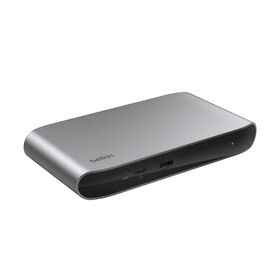
Compare Belkin Thunderbolt Docks
Thunderbolt gives you the most bandwidth Belkin makes, for the fastest displays, storage, and wired networking over one cable. Compare the Thunderbolt 5 and Thunderbolt 4 range by speed, ports, display support, and charging.
| Product | Thunderbolt | Ports | Video Out | Power & Best For |
|---|---|---|---|---|
| Connect Thunderbolt 5 Dock | Thunderbolt 5, up to 80Gbps (120Gbps Bandwidth Boost) | 14 ports: Thunderbolt 5, USB-C, USB-A, HDMI, 2.5Gb Ethernet | Triple 4K at 144Hz or 8K at 60Hz | Up to 140W PD. Fastest desk: triple display, 2.5Gb Ethernet, and daisy-chaining |
| Pro Thunderbolt 4 Dock | Thunderbolt 4, up to 40Gbps | Multiport: 2x Thunderbolt 4, USB-C, USB-A, Gigabit Ethernet, SD, 3.5mm audio | Single 8K at 30Hz, dual 4K at 60Hz, triple on compatible laptops | Up to 90W PD. Full-featured TB4 desk dock with Ethernet and card reader |
| Thunderbolt 4 5-in-1 Core Hub | Thunderbolt 4, up to 40Gbps | 5 ports: 4x Thunderbolt 4, USB-A | Dual 4K at 60Hz or single 8K | Up to 96W PD. Compact core hub for the highest-bandwidth displays and 40Gbps storage |
Learn More About Thunderbolt
-
 What Is Thunderbolt? The Ultimate Guide
-
 Thunderbolt 5: The Complete Next-Gen Guide
-
 9 Best USB-C Dock Features to Optimize Your Flow
-
 Docking Stations: The Ultimate Buying Guide
-
 USB-C Hubs, Docks & Adapters: How to Choose
-
 New: Belkin Connect USB-C 11-in-1 Pro GaN Dock 150W
-
 DisplayPort vs HDMI: Which Do You Need?
-
 USB-C Power Delivery: Fast Charging Up to 240W
-
 Connect Smart and Stay Productive
-
 What Is USB-C? The Complete Guide
-
 USB-C Charging Explained: Safety and FAQs
Thunderbolt Docks: Your Questions Answered
A Thunderbolt dock expands one Thunderbolt or USB-C port into many, adding monitors, external drives, wired Ethernet, and other peripherals over a single cable. It works with Windows and Mac. Belkin's flagship Connect Thunderbolt 5 Dock shows the top of the range, with 14 ports and triple-display support.
A Thunderbolt dock connects monitors, drives, keyboards, and wired networking to a laptop over one cable, and passes power back to charge the laptop. Thunderbolt 4 runs at up to 40Gbps and Thunderbolt 5 at up to 80Gbps, and both can daisy-chain up to six Thunderbolt devices. A full-featured example is the Pro Thunderbolt 4 Dock. Compatible with Windows and Mac.
A Thunderbolt dock is worth it if you want the fastest data and display performance, more power, and more ports than a standard USB hub, all over one cable. If you mostly need a couple of ports on the move, a compact option like the Thunderbolt 4 5-in-1 Core Hub may be enough.
Most do. Many Thunderbolt docks pass power through to charge a compatible laptop over the same cable that carries video and data, though wattage varies, so check the dock's Power Delivery rating. Belkin Thunderbolt docks reach up to 140W. For desk-focused options, see our laptop docking stations.
No. Thunderbolt is a high-speed technology from Intel, while USB-C is a connector shape. Thunderbolt 3, 4, and 5 use the USB-C connector, so they look the same, but Thunderbolt adds much higher speed and display support. All Belkin Thunderbolt products are certified. Learn more in our Thunderbolt technology guide.
Yes. Thunderbolt docks are backward compatible with USB-C laptops, though a USB-C host runs at USB-C speeds, not full Thunderbolt speed. If you only need USB-C, a USB-C hub may be a simpler fit. Older Thunderbolt 2 and 1 devices need a physical adapter.
A Thunderbolt 3 dock uses Thunderbolt 3 over the USB-C connector for high-speed data, power, and multi-port connectivity. Thunderbolt 4 and 5 build on it with guaranteed minimums and higher speeds; see how the standard has evolved in our Thunderbolt 5 guide.
Yes, with a physical adapter. Thunderbolt 2 uses a different connector than Thunderbolt 3, so you need Apple's Thunderbolt 3-to-2 adapter plus a certified cable such as a Thunderbolt 4 cable for the Thunderbolt 3 side.
Yes. A Thunderbolt 4 dock works with a Thunderbolt 3 laptop, but the connection is capped at Thunderbolt 3 specs. The same backward compatibility runs through the whole Docks and Hubs range.
Yes. Thunderbolt 4 docks run with Thunderbolt 3 and USB-C hosts at the host's speed, and Thunderbolt 5 docks are compatible too. Thunderbolt 2 and 1 need a physical adapter. For help matching a dock to your laptop, see the docking stations buying guide.
Yes. Thunderbolt docks work with Mac computers that have Thunderbolt or USB-C ports, including Apple silicon MacBooks, though the number of external displays a Mac supports varies by model. See which features matter most in 9 best dock features.
"Thunderbolt docking station" is another name for a Thunderbolt dock: a desk device that adds many ports and multiple displays and charges your laptop over one Thunderbolt cable. The difference from a plain hub is the dedicated power supply and the higher bandwidth. For a full breakdown of dock types, see our Hubs, Docks and Adapters guide.