Premium accessories for Galaxy S26. Shop now.

Nintendo Switch 2 Charging Cases:
Everything You Need to Know Before You Buy
February 23, 2026
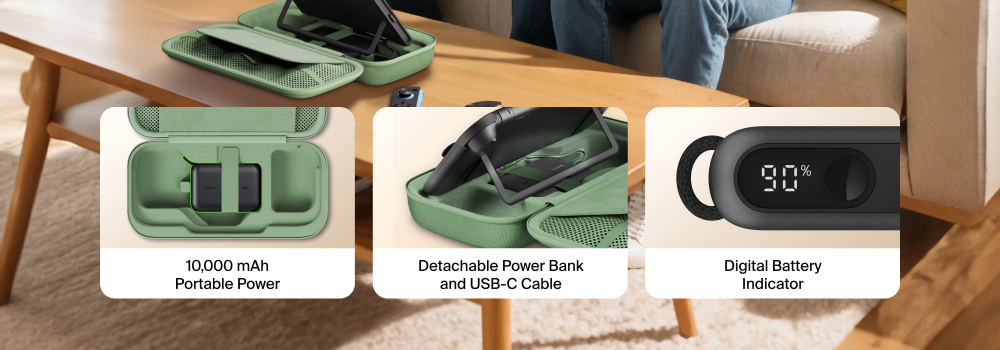
If you’ve recently picked up a Nintendo Switch 2, you’ve probably noticed one thing pretty quickly: battery life can disappear fast, especially in more demanding games.
The Switch 2 is more powerful than previous models, which is great for performance, visuals, and smoother gameplay. But that extra power can also mean you reach for a charger sooner than expected. For commuters, travelers, and long-session players, that can be frustrating.
That’s where charging cases come in.
A Nintendo Switch 2 charging case combines two things gamers already want, protection and portable power. Instead of packing a separate power bank and cables, a charging case keeps everything in one place so you can keep playing without interruptions.
In this guide, we’ll break down how Switch 2 charging cases work, what to look for, and common questions like overheating and screen scratches.
Why Nintendo Switch 2 Charging Cases Are So Popular
The main reason is simple: portable gaming needs portable power.
Many players report getting around 2 to 3 hours of playtime on high-performance titles before needing to recharge. That might be fine at home, but it is not ideal for:
- Flights and long travel days
- Commutes
- Road trips
- Long multiplayer sessions
A charging case helps solve that by giving you backup power while keeping your console protected.
Fun fact: lowering brightness from 80% to 50% can noticeably extend playtime, but it still won’t beat having a backup battery ready when you need it.
4 Features to Look for in a Switch 2 Charging Case
Not all charging cases are created equal. Here are the features that matter most.
1) Battery capacity and real-world value
Most charging cases use a built-in power bank around 10,000mAh, which can often provide up to 1.5 full recharges, depending on usage and battery conditions.
2) Storage and organization
A good case should help you stay organized, not just keep the console safe. Look for:
- Game cartridge storage
- Mesh pockets for cables
- Space for small accessories
- Secure fit so the console does not shift inside
3) Easy battery checking
Older charging cases made you open the case to check remaining battery power. Newer models may include external indicators, which is a huge quality-of-life improvement.
4) Safe interior materials
One of the biggest complaints in forums is scratches caused by poor interior design. A quality case should include:
- Soft interior lining
- No exposed hard edges near the screen
- Pockets positioned so accessories cannot press into the display
Will My Switch 2 Overheat While Charging in a Case?
This is one of the most common questions, and it’s a fair one.
The Switch 2 can generate heat during intense gameplay, especially with high-performance titles. Charging also creates heat. So the idea of charging inside an enclosed case can sound risky.
The best practice is:
- Use charging cases to charge while the console is in sleep mode or powered off
- Avoid charging inside the case while actively playing demanding games
Most reputable charging cases are designed with heat in mind, but user habits still matter. If your console feels warm, let it cool down before charging.
Do Charging Cases Scratch Nintendo Switch 2 Screens?
They can, but usually only when the case design is poor.
Scratches typically happen when:
- The interior material is rough
- The console can slide around
- Accessories are stored in a way that presses into the screen
- Zippers or hard edges contact the display
Quick protection tip: adding a tempered glass screen protector is one of the simplest ways to prevent damage, even if you are using a premium case.
How Much Should a Nintendo Switch 2 Charging Case Cost?
A quality charging case often costs more than a basic travel case, but you’re also getting a built-in power bank.
In general:
- Standard protective cases are often the budget-friendly choice
- Charging cases are best when you need battery support while traveling or commuting
If you already own a power bank and do not mind carrying it separately, a non-charging travel case might be enough.
Recommended Belkin Nintendo Switch 2 Cases
If you’re ready to narrow it down, here are a couple of Belkin Switch 2 cases that match the most common needs, whether you want an all-in-one charging case for travel or a lightweight option for everyday protection.
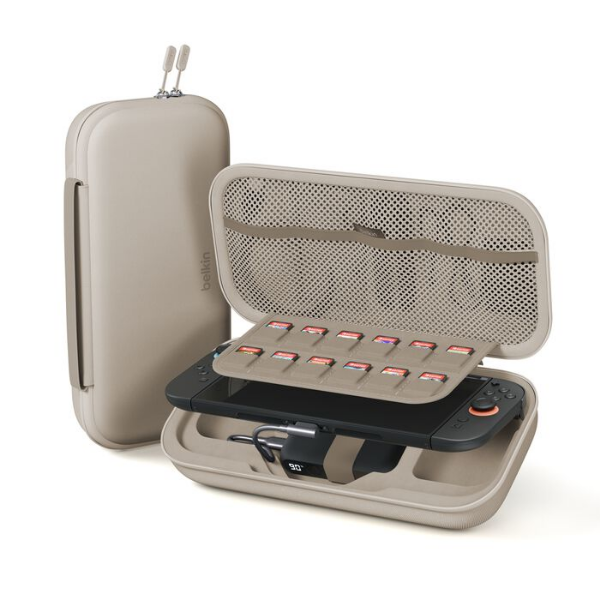
Best for: Travelers who want protection and extra battery without carrying a separate power bank.
Charging Case for Nintendo Switch 2
- Integrated 10,000mAh power bank for extended playtime
- All-in-one design, console protection plus charging in one case
- Built for travel, reduces cable clutter and keeps gear together
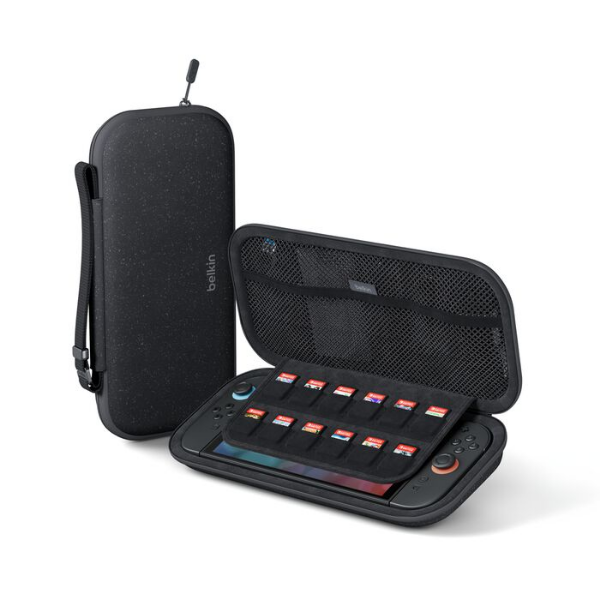
Best for: Everyday protection when you do not need built-in charging.
Travel Case for Nintendo Switch 2
- Lightweight and compact, easy to throw in a backpack
- Protective structure for daily commutes and storage
- Designed for simple grab-and-go use
Tip: Many gamers keep a travel case for daily use, and a charging case for long trips.
Charging Case or Travel Case? Side-by-Side Comparison
Are Third-Party USB-C Chargers Safe for Nintendo Switch 2?
In most cases, yes, as long as you use reputable brands.
The Nintendo Switch 2 supports USB Power Delivery (PD), which means it negotiates power draw intelligently. Using a higher-watt charger does not automatically mean the console will “take too much” power.
Smart charging tip: if you are using a charging case, focus on a good USB-C cable and a reliable wall adapter so the case recharges quickly between sessions.
Do Switch 2 Charging Cases Support Pass-Through Charging?
Some do, some do not.
Pass-through charging means you can charge the case while it is also charging the Switch 2 at the same time. This can be useful if you are short on time and want to top everything up in one go.
If this feature matters to you, check product specs before buying.
Who Should Buy a Nintendo Switch 2 Charging Case?
A charging case makes the most sense if you:
- Travel often
- Commute and game on the go
- Play battery-heavy games regularly
- Want a clean, minimal setup with fewer accessories
- Hate the feeling of your battery dying mid-session
If you mostly play docked at home, a standard protective case may be enough.
Conclusion: The Best Switch 2 Charging Case Is the One That Matches Your Play Style
Nintendo Switch 2 charging cases are popular for a reason. They solve a real problem for modern handheld gaming: battery life that can drop quickly during high-performance play.
If you travel, commute, or just want longer sessions without thinking about outlets, a charging case is one of the most practical upgrades you can make. If you want something lighter for everyday protection, a standard travel case can still do the job.
Either way, choosing a case with smart storage, soft interior materials, and reliable charging support will make your Switch 2 experience smoother and less stressful.
Yes, especially if you travel or play away from outlets often. They combine protection and backup power in one item.
It depends on the case, but it’s generally better to charge while the console is asleep or off to reduce heat buildup.
Charging accessories from reputable brands should not harm battery health when used normally. Avoid overheating and do not leave devices charging in extreme heat.
Many cases are designed to fit the console with Joy-Cons attached and include storage for games and small accessories, but capacity varies by model.
They help with everyday protection, bumps, and scratches. They are not a replacement for heavy-duty rugged protection, but they are better than carrying your Switch loose.
10,000mAh is a common sweet spot. It provides meaningful extra playtime without making the case too bulky.
Yes. Even premium cases can cause scratches over time, especially if dust or debris gets inside.
We hope you enjoyed this post!
Explore more on the Belkin Blog,
or sign up for email and text alerts: get the latest blog updates, product announcements, and exclusive deals delivered right to you.