Premium accessories for Galaxy S26. Shop now.

Belkin Extends Solution for Sharing Screens in Large Spaces
December 10, 2025

Fortune 500 Financial Services Company
Fortune 500 Financial services company championing the new ConnectAir Wireless HDMI Display Adapter.

The Challenge:
Connecting personal devices to project on displays for seamless presentations across many professional settings.
Across industries, organizations of all sizes face similar frustrations when connecting personal devices to shared displays. From everyday team meetings to high-profile presentations, unreliable connections and cumbersome setups can quickly derail communication, waste valuable time, and erode confidence in the technology meant to support collaboration.
Presenters often struggle to wirelessly connect laptops, tablets and phones to large displays without glitches. Spotty Wi-Fi, lag and degraded resolution frequently interrupt presentations, making even simple screen mirroring unpredictable and frustrating.
Different devices, operating systems and display technologies rarely play nicely together. Teams rely on dongles, adapters and complex setups — especially problematic in unfamiliar venues or during remote meetings — leading to wasted time and rising stress levels.
Cables tether presenters to one spot, while constant software updates and rigid A/V setups restrict movement and spontaneity. This not only limits engagement but also undermines presenters’ confidence and the overall impact of their message.
Disruptions from lagging Wi-Fi, missing adapters, and tangled cords made presenting feel more like troubleshooting than communicating. Inconsistent device compatibility and complex configurations created unnecessary stress—especially in high-stakes financial environments where timing and confidence matter most. These hurdles underscored the need for a more seamless, reliable way to connect and present—one that would restore focus, flexibility, and trust in every meeting.
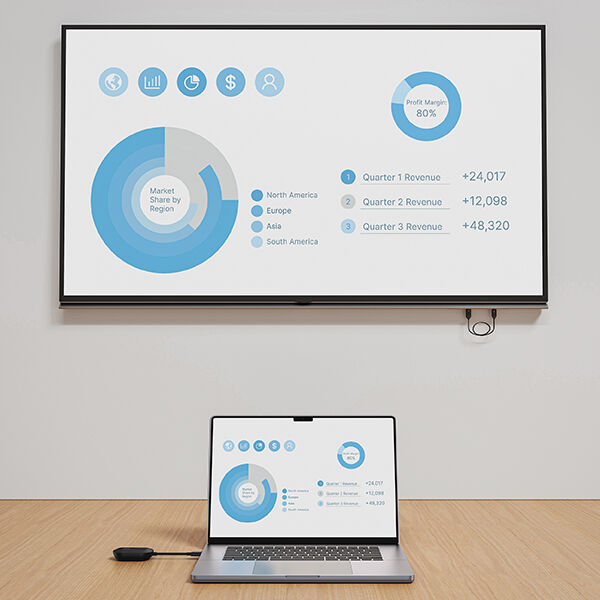
“Previously there were occasions where you'd drop your connection as you're trying to put your feed up on the monitor”
- AV/tech provisioning team member
The Solution:
Pair and screenshare to present anywhere.
The fortune 500 financial services company implemented the new Belkin ConnectAir Wireless HDMI Display Adapter to mirror displays in presentation scenarios.
“The ConnectAir Display Adapter connected easily and after I plugged it into my laptop I was sharing within five to ten seconds,” said a member of the company’s AV/tech provisioning team. This team manages conference room technology and digital signage throughout the company’s multiple campuses in the US and Canada. After testing the technology for a couple of weeks, company executives returned with rave reviews “The reception was pretty phenomenal and one of our CIOs confessed ‘I don't want to give it back’.”
ConnectAir adapters are configured to wirelessly mirror and/or extend from display-enabled USB-C host devices in business settings. Users can present from a laptop, tablet or phone with ease and confidence because the transmitter and receiver communicate independently without the use of a network, WiFi or Bluetooth connection. This dedicated signal ensures that projected or streamed content comes across flawlessly without delay or glitches. Presenters have the capability to project HDMI monitor resolutions up to 1080p@60Hz with the freedom to move about within a range up to 131 feet. And an added bonus is that the device doesn’t require downloading any apps, software or drivers.
The AV/tech team member noted that the setup and installation process was seamless and where the adapter makes the biggest difference is its ease of use. “I plugged it into the monitor and had it set up in a matter of seconds,” they said. “I love how the audio just transmits right away, and you don't have to go fumble around in your audio settings to utilize that part of it.” The adapter’s compact size was also a strong suit that stood out. “It's so small and transportable. I can bring it with me wherever we go and just plug it in and say, check this out.”
“The ConnectAir Display Adapter connected easily and after I plugged it into my laptop I was sharing within five to ten seconds.”
- AV/tech provisioning team member
Snapshot of ConnectAir Wireless HDMI Display Adapter
Key benefits and features:
- Wirelessly screenshare extended or mirrored at 1080p@60Hz with audio in large spaces like conference rooms, classrooms and auditoriums
- Plug and play conveniently without relying on spotty WiFi or a network, with no driver installation required
- Long range capability allows freedom of movement up to 131 ft./40m, so you’re not tethered to a connecting cable
- Supports a wide range of devices including laptops, tablets, projectors and smartphones. Will work with any display-enabled USB-C host device
- Protect information with peer-to-peer connection providing security within a private network
- Enjoy seamless screen casting with latency below 80ms, providing little to no lag
- Gain peace of mind with a 4-point safety system:
- Over-voltage protection
- Overload protection
- Over-current protection
- Over-temperature protection
- Includes a 2-year warranty

The Results:
Set presenters up for success with a plug and play solution.
After repeated disruptions caused by unreliable connections and inconsistent A/V setups, the need for a smoother presentation experience became clear. The introduction of the ConnectAir Wireless HDMI Adapter transformed those challenges into strengths — delivering dependable performance, easier collaboration and a more confident experience for presenters across all settings.

Seamless, universal connectivity
<5 Setup was completed in under five minutes per unit.

Reliable performance that builds confidence
100% The number of tested performance factors that were rated Excellent. Factors rated were Connection reliability, Video and Audio quality, Response time, Range and Coverage and Overall performance.

Efficiency and collaboration gains
1-2 The number of minutes users save per meeting thanks to this instant wireless setup, adding up to hours saved over a typical month.
The ConnectAir Adapter quickly presented its value across the company’s operations, streamlining meetings and promising efficiency from the boardroom to the sales floor. “Our execs are always in a hurry and their meetings are bang, bang, bang,” they said. “My guess is that with this adapter they could gain at least a half hour of their time back every month.” They also anticipates smoother, more reliable interactions with clients, adding, “This adapter will make things run smoothly when they’re trying to make a sale and they can’t afford to have issues and struggle with the tech.” With its ease of use and dependability, the ConnectAir Adapter represents a major opportunity to enhance efficiency and confidence across business environments.
The reception was pretty phenomenal and one of our CIOs confessed ‘I don't want to give it back’.”
- AV/tech provisioning team member
We hope you enjoyed this post. Signup for blog alerts, product announcements, and exclusive deals via emails and texts now.