
iPhone 16のバッテリー寿命を最大限に延ばす方法:充電&設定のヒント
2024年9月9日
Appleご愛用のお客様が待ちかねていたiPhone 16がついに登場しました。Apple最新モデルのiPhoneに搭載されている数多くの素晴らしい新機能を最大限に活用しましょう。これらのアップデートでは、iPhone 16のバッテリー寿命を最大限に維持することに重点を置いて、楽しみが中断されないようにすることが重要です。このブログでは、バッテリーの充電とバッテリーのパフォーマンスを最大化するための設定の調整に関するヒント、バッテリーの状態を管理するためのベストプラクティスについて解説します。これらを採り入れることで、新しいスマートフォンの寿命を延ばして最大限に活用できるようになります。
バッテリーの状態を理解する
iPhoneには、効率の良さで知られるリチウムイオン電池が採用されています。ノートパソコンや携帯電話からハイブリッドカーや電気自動車まで、リチウムイオン電池は数多くの毎日の必需品に電力を供給しています。従来のバッテリーよりも速く充電でき、小さなパッケージに強力なパワーを詰め込めるように設計されています。バッテリーの損傷の原因、そして効率を高めて寿命を延ばすためにできることをご紹介します。
- 充電サイクル:iPhoneのバッテリーは充電サイクルを繰り返します。バッテリー容量の100%に相当する電力を消費すると、1サイクルが終了します。時間が経つにつれて、これらのサイクルを通じてバッテリーの寿命が短くなっていきます。
- 熱:過度の熱により、バッテリーの劣化が早まる可能性があります。iPhoneを日光が降り注ぐビーチなどの高温の環境に置いたり、充電しながら使用したりすると、より多くの熱が発生する可能性があります。携帯電話がオーバーヒートすると、温度の警告が表示されたり、アプリが動かなくなったり、クラッシュしたり、携帯電話が突然シャットダウンしたりします。iPhoneは摂氏16°~22°C(華氏62°~72°)の温度範囲で保つようにしてください。
- 充電の習慣:バッテリーを頻繁に0%まで充電切れの状態にしたり、常に100%まで充電したりすると、バッテリーの寿命が短くなります。リチウムイオン電池は、25%~85%の充電を維持すると最も長持ちします。都合の良いときにいつでも携帯電話を充電し、頻繁に電池切れにしないようにすると、バッテリーの寿命を最大限に延ばすことができます。
iPhoneのバッテリー設定のヒント
設定だけでも、iPhoneのバッテリー寿命を最大限に伸ばす方法はたくさんあります。バッテリー寿命を延ばすのに役立つシンプルな最新の方法をいくつかご紹介します。
- 画面の明るさを下げる:画面の明るさを下げたり、明るさの自動調節を有効にしたりすると、バッテリーを大幅に節約できます。設定>ディスプレイ&明るさにアクセスしてください。
- アプリのバックグラウンド更新をオフにする:バックグラウンドで更新する必要のないアプリの場合は、この機能を無効にします。設定>一般>アプリのバックグラウンド更新にアクセスしてください。
- 位置情報サービスを制限する:必要な場合にのみアプリに位置情報へのアクセスを許可します。設定>プライバシー>位置情報サービスにアクセスしてください。
- プッシュメールを無効にする:データを手動で取得するか、より低い頻度で取得するようにメールを設定します。設定>メール>アカウント>新しいデータを取得にアクセスしてください。
- 不要な通知をオフにする:通知の数を減らすと、バッテリー寿命を延ばすことができます。設定>通知にアクセスしてください。
- ダークモードを使用する:携帯電話をダークモード(メールやメッセージを黒い背景で表示)に変更すると、バッテリーの寿命を延ばして使用量を延ばすことができます。設定>ディスプレイ&明るさにアクセスしてください
- ナビゲーションアプリを制限する:Wazeなどのナビゲーションアプリは、目的地に到着した後もGPSの使用を継続します。設定>アプリ(Wazeなど)>位置情報にアクセスしてください。
iPhoneの充電に関するベストプラクティスのトップ5
適切な充電器を使用している場合でも、バッテリーの状態と寿命は充電方法によって左右されます。正しい習慣でiPhone 16を充電するためのヒントとベストプラクティスをいくつかご紹介します。
- 過充電を避ける:携帯電話を過充電すると余分な熱が発生します。iPhone 16などの新しいスマートフォンには過充電を防ぐ仕組みが備わっていますが、それでも充電が80%程度になったら充電器から外すことがベストプラクティスです。
- バッテリー充電の最適化:iPhone 16には、毎日の充電習慣を学習してバッテリーの消耗を最小限に抑える「バッテリー充電の最適化」機能が搭載されています。この機能では、使用するまで、80%を超えた時点で充電が停止します。これは、設定で有効にすることができます。
- iOSを更新する:デバイスが常に最新のソフトウェアに更新されるようにしてください。そうすることで不具合や速度低下が解消され、それらを補うためにバッテリーが過剰に消費されることを防ぎます。
- 設定を最適化する:できる限り画面の明るさを調整するようにしてください。明るさの自動調節を有効にすると、周囲の状況に応じて明るさを調整でき、バッテリーの寿命を延ばすことができます。さらに、利用可能な場合はデフォルトでWiFi接続に設定することで、携帯電話データよりもバッテリー消費を低減できます。
- 低電力モード:このモードを使用すると、携帯電話のバッテリーが20%に達すると通知が届き、デバイスのパフォーマンスの最適化が開始されます。たとえば、特定のアプリはバックグラウンドでのコンテンツのダウンロードを停止し、一部のアプリは無効になります。電話、Eメール、メッセージ、インターネットなどの重要な機能は引き続き使用可能で、携帯電話が充電されると自動的にオフになります。
iPhoneの充電器の種類:有線充電とワイヤレス充電
有線充電がワイヤレス充電よりも優れているのかどうか、多くの方が疑問に思われているはずです。どちらかが優れているわけではありませんが、これらの違いを理解することで、お客様に最適な選択に役立ててください。留意すべき要素がいくつかあります。
- 充電速度:有線充電はワイヤレス充電よりも高速です。ただし、マグネットを使用して急速かつ効率的な充電を実現するMagSafeやQi2などのワイヤレス充電技術によって、ワイヤレス充電も以前より急速になっています。
- 便利:ワイヤレス充電はケーブルの煩雑さを軽減してくれるほか、外出先でも旅行にも便利です。
- 価格:有線充電の価格は手頃で、通常は20~40ドルです。ワイヤレス充電器の場合は、20~150ドルの価格帯です。
- ケーブルの品質:iPhoneを充電するために選択するケーブルは、充電器と同じくらい重要です。高品質のUSB-IF認定ケーブルを使用すると、充電器からバッテリーへの電力転送が効率的になり、電気的なショートや過熱のリスクが最小限に抑えられます。LightningケーブルでもUSB-Cケーブルでも、ベルキンでは安全で信頼性の高い充電のためのさまざまなオプションをご用意しています。
iPhone向けの充電器を選択する際のポイント
使用する充電器の種類は、iPhoneのバッテリー寿命にも影響します。バッテリー寿命を延ばすのに役立つものを見つけることは非常に重要です。充電器を選ぶ際には、必ず以下の要素を考慮してください。
- USB-IF認証充電器:USB-IF(USB Implementers Forum)は、USBテクノロジーに対する互換性と機能性を保証する団体です。USB-IF認定は、充電器が業界で定められた標準を満たし、優れたパフォーマンスを提供する高品質の製品であることを意味します。認定されていない充電器では電圧制御が適切ではない場合があるため、iPhoneで熱が発生する恐れがあります。さらに、低品質の充電器は電気ノイズを発することが多く、iPhoneの携帯電話機能や無線機能に干渉し、不要な信号を抑制しようとするためにさらに熱が発生します。
- ワット数と電力供給:iPhone 16は急速充電に対応しており、適切なワット数の充電器を使用した場合に大きな違いが見受けられます。
- 充電の急速化:携帯電話のバッテリーをできるだけ速く充電したい場合は、携帯電話が処理できるワット数に対応する充電器が必要です。
- 効率的な電力管理:USB-IF認定充電器は、電力供給を効率的に管理するように設計されており、携帯電話と連携してバッテリーの過熱や過負荷を防止します。
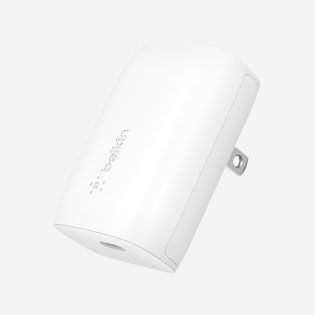
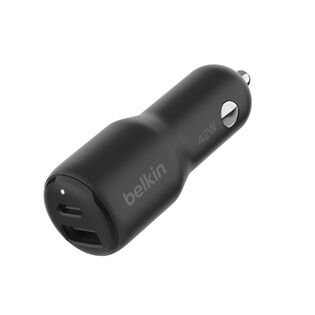
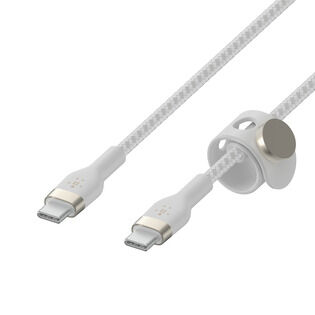
iPhone 16向けの充電アクセサリ
バッテリーを適切に管理すると、バッテリーの寿命が延びるだけでなく、デバイスの全体的なパフォーマンスも向上します。賢く選択してスマートに充電しましょう。厳密にテストされた評価の高い高品質の充電オプションをご覧ください。
How to Save iPhone 17 Battery: FAQs
Yes, it's safe to charge your iPhone 17 overnight. Make sure Apple's Optimized Battery Charging feature is enabled in Settings > Battery > Charging. It learns your daily routine and waits to finish charging past 80% until you actually need it, which reduces wear on the battery over time.
No. The iPhone 17, 17 Pro, and 17 Pro Max are designed to handle USB Power Delivery fast charging up to 40W safely, with built-in thermal management and charging-curve logic that protects long-term battery health. iPhone Air handles its 20W ceiling the same way.
Use USB-IF certified chargers and cables, avoid extreme temperatures, enable Optimized Battery Charging in Settings, and try to keep the battery between 25% and 85% rather than letting it drain to 0% or sit at 100% for long stretches.
Apple rates iPhone 17 Pro Max at up to 39 hours of video playback, the longest battery life of any iPhone to date. iPhone 17 Pro is rated at up to 33 hours, iPhone 17 at up to 30 hours, and iPhone Air at up to 27 hours.
Yes. The charger you choose affects both charging speed and long-term battery health. For iPhone 17 Pro models, a 40W or higher USB PD charger unlocks full 40W fast charging. For iPhone Air, anything 20W or higher gives you full speed. Always look for USB-IF certified chargers and a USB-C to USB-C cable rated for at least 60W (3A).
Yes. iPhone 15, iPhone 16, iPhone 17, and iPhone Air all use USB-C. iPhone 14 and earlier still use Lightning.
Use USB-IF certified chargers and cables, enable Optimized Battery Charging in Settings, keep your iPhone within Apple's recommended temperature range (16 to 22 degrees C / 62 to 72 degrees F), and try to keep the battery between 25% and 85% in normal daily use rather than running it to 0% or sitting at 100% for hours. For travel, where temperature extremes and unreliable outlets are common, a TSA-approved power bank is a useful safety net.
No. Any USB-IF certified charger is safe to use with iPhone 17. USB Power Delivery negotiates voltage and current with the phone, so even a 100W laptop charger only delivers what the iPhone is designed to draw.
Yes, the iPhone 17 family delivers meaningful battery improvements over iPhone 16 across every model:
- iPhone 17 Pro Max: up to 39 hours video playback (vs iPhone 16 Pro Max at 33 hours)
- iPhone 17 Pro: up to 33 hours (vs iPhone 16 Pro at 27 hours)
- iPhone 17: up to 30 hours (vs iPhone 16 at 22 hours)
- iPhone Air: up to 27 hours (no direct iPhone 16 equivalent)
iPhone 17 also supports faster wired charging (40W vs ~30W on iPhone 16) and faster wireless charging via Qi2.2 (25W on Pro models vs 25W MagSafe on iPhone 16). For battery longevity, both generations support Apple's Optimized Battery Charging, so the day-to-day care advice in this guide applies to either.


投稿をお読みいただきありがとうございました。ブログの通知、製品発表、特別セールについての情報をメールまたはショートメッセージの受信をご希望の方は、ぜひご登録ください。