
用户真正关心的无线 HDMI 显示适配器问题
2026年4月8日

商务用户与差旅人士的真实需求调研
自广受欢迎的 ConnectAir 无线 HDMI 显示适配器上市以来,贝尔金深入调研了各类论坛、产品评价、IT 社群讨论以及旅行博客,旨在了解用户在使用无线 HDMI 适配器时的真实诉求。两个截然不同的用户群体出现了:一是试图解决会议室中的使用难题的企业用户,二是希望无需繁琐操作就能使用酒店电视的高频差旅人士。本文整合了本次调研所得的洞察,文末附有序号标注的参考资料。
第一部分:会议室投屏困境
为何会议总因线缆问题迟迟无法开始?
数十份调研资料显示,最普遍的吐槽集中在一点:有线连接严重浪费时间。无论企业规模大小、所属行业如何,这一问题都普遍存在。会议之所以推迟开始,往往是因为有人找不到合适的缆线、缆线长度不够,或是演示者的笔记本电脑缺少对应接口。
不少资料都用“四处寻找 HDMI 缆线”来形容多数会议开始前的固定流程。某行业博客提到,演示者最终会“受限于可用缆线的长度,只能固定坐在某个位置”。
当需要多位演示者轮流发言时,问题会进一步加剧。瑞典 IT 公司 Leetcom 的一项案例研究指出,多人轮流切换连接时,传统投屏设备的混乱程度堪比“抢椅子游戏”。
哪些笔记本接口可用于会议室显示器?
自带设备办公政策导致了接口类型杂乱的问题。新款 MacBook 仅配备 USB‑C 端口。老式 Windows 笔记本则可能搭载 HDMI、Mini DisplayPort 或 VGA 接口;iPad 与手机还需搭配专用适配器。IT 部门不得不储备大量适配器,可偏偏在有人急需时,总是缺那一款。
某旅行论坛的一条评论精准道出了这种无奈。一位用户援引其企业音视频部门同事的话说:“就算你带上世上所有缆线和适配器,遇到新场景时,也永远差那么一根正好要用的。”
这番说法虽属个人经验,却引发广泛共鸣,因为它道出了真实的后勤困境。接口标准种类繁多,早已超出单套缆线配件所能覆盖的合理范围。
外部演示者接入
对于经常接待外部访客的企业而言,基于网络的演示系统会造成诸多不便。正如一家音视频咨询公司所言:“通常情况下,访客和员工所使用的网络是分开的,而大多数演示都需要将设备接入同一网络才能进行。”
基于硬件的无线 HDMI 则完全避开了这一问题。它在发射器与接收器之间建立直接的射频连接,无需依赖任何网络基础设施,访客接入变得极为简便。访客只需插上发射器,信号即可传输至连接显示器的接收器,操作就此完成。无需网络凭证,无需安装软件,也无需 IT 人员介入。
安全考量
IT 部门对于自带设备办公 (BYOD) 的安全担忧已有大量记录。据行业调研显示:“自带设备办公的主要风险,在于企业对员工自有设备缺乏管控。”一份报告指出,每五家企业中就有一家曾因未经授权的 IT 设备而发生过网络安全事件。
独立式无线 HDMI 设备实际上会降低而非增加此类风险。该技术基于硬件运行,不接入企业网络,因此消除了一个潜在的攻击途径。没有可被利用的软件,不交换网络验证信息,也不存在演示设备向其他网络资源横向渗透的可能。
某厂商强调,其系统 “无需接入企业网络,同时通过 128 位 AES 加密技术,保护企业机密与知识产权免遭窃听。”
尽管这显然是厂商的宣传用语,但其核心技术表述准确无误。带加密功能的硬件级无线 HDMI 设备可实现网络安全隔离,这是软件类投屏方案无法比拟的优势。
美观度与专业形象
一个不那么显眼、却常被提及的问题,是缆线在会议空间造成的视觉杂乱。某咨询公司的指南中提到:“建筑师与设计师费尽心思打造出美观的会议室,可一旦装上音视频系统,整体格调就全被破坏了。”
这件事的重要性远超表面观感,尤其在面向客户的场所更是如此。一间杂乱缠绕着缆线与各式适配器的董事会议室,与桌面整洁、设备隐而不显、仅在使用时才显现的会议室,给人的观感截然不同。
第二部分:差旅人士的困境
我的笔记本电脑为什么连不上酒店电视?
商务旅客普遍对酒店电视连接问题感到头疼。相关吐槽主要集中在这几类:HDMI 接口位置刁钻难以插拔(紧贴墙面安装)、信号源输入切换功能被禁用,以及专用控制系统屏蔽了电视的常规操作。
这并非偶然情况。正如某论坛讨论所指出的:“酒店影音服务商经常会禁用电视上的输入接口。”一位前酒店员工在其他平台的评论则更为直白:“酒店电视就是故意被限制了功能。”
这么做的动机,一方面是为了保障营收(酒店希望客人使用付费点播服务),另一方面也出于运维考量。有评论者解释:“他们实在经不起每隔几天,就被一个个自认懂音视频的客人把设备搞出问题。”
还有一则令人印象深刻的趣事:有用户向前台求助连接笔记本电脑,结果被告知酒店可以按每天 100 美元的价格租给他一台显示器。
我的电视棒在酒店无线网络上为什么用不了?
不少人会随身携带 Roku、Fire TV Stick 这类电视棒作为替代方案。但正如某科技媒体所述:“大多数酒店的无线网络都使用强制门户认证,连接时必须输入密码,或至少同意服务条款才能上网。”
电视棒无法完成强制门户的登录流程,因此在多数酒店网络下都无法使用,除非借助手机热点等额外方法。而这又会引发一系列新问题,比如蜂窝数据资费增加,以及酒店内侧房间可能出现的信号不佳等情况。
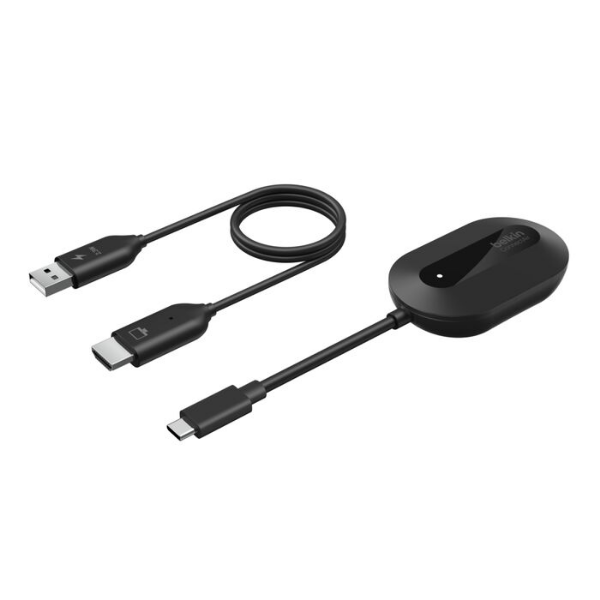
Best for: Cable-free screen sharing.
ConnectAir Wireless HDMI Display Adapter
- Plug-and-play with no WiFi, apps or drivers needed
- Mirror or extend your display in up to 1080p HD
- Long-range, low-latency performance for smooth streaming
| Feature | Streaming Stick | Wireless HDMI |
|---|---|---|
| Works on captive portal WiFi | No | N/A (no WiFi needed) |
| Works with locked-down hotel TVs | No | Yes |
| Requires app installation | Yes | No |
| Works with any USB-C laptop | No | Yes |
无线 HDMI 为差旅人士带来的优势
无线 HDMI 可同时绕过酒店电视锁定与强制门户认证两大难题。某厂商如此描述这一场景:“与部分仍依赖本地 Wi‑Fi 或手机热点的‘无线’系统不同,[无线 HDMI] 在发射器与接收器之间建立直连信号。”
由于连接完全独立闭环,酒店 Wi‑Fi 是否需要认证、电视系统是否被软件锁定都无关紧要。接收器接入 HDMI 接口,发射器连接你的设备,无线链路即可独立于其他基础设施运行。
产品介绍中常将便携性作为卖点。某款无线 HDMI 套装宣传道:“专为旅途打造的设计:小巧轻便,适配商务出差与休闲旅行,无需在陌生电视上登录即可畅享影片。”
最后这一点 – 无需在陌生电视上登录 – 深得注重安全的差旅人士的认同。酒店智能电视向来以安全防护不严著称,在公共设备上输入流媒体账号密码存在明显安全风险。
双重用途:演示和娱乐
某厂商的宣传语精准道出了无线 HDMI 设备的普遍价值:“在一整天的演示结束后,这款帮您高效完成工作的便携 [设备],摇身一变就成为出色的休闲娱乐搭档。”
无线 HDMI 显示适配器完美胜任这一双重角色。工作时,它可在陌生的会议室环境中流畅完成投屏演示。到了晚间,又能将酒店客房电视变成笔记本电脑的扩展屏,用于休闲娱乐。只需一台设备即可解决两大问题,对想要精简随身行李的人来说,性价比极具吸引力。
常见差旅场景
下表汇总了无线 HDMI 对商务差旅人士实用的常见场景:
| Scenario | The Problem | How Wireless HDMI Helps |
|---|---|---|
| Hotel room entertainment | TV inputs locked: captive portal WiFi blocks streaming sticks | Direct wireless connection required no network access |
| Client site presentation | Unknown equipment; wrong cables or adapters | Self-contained system works with any HDMI display |
| Extended stay or Airbnb | Unfamiliar TV setup; no access to streaming apps | Mirror your laptop with all your own content and accounts |
| Working from hotel room | Small laptop screen makes spreadsheets and documents hard to read | Use hotel TV as a second monitor for expanded workspace |
| International travel | Different plug types; voltage concerns with powered devices | USB powered from laptop or standard phone charger |
第三部分:技术问题与实际预期
无线 HDMI 的延迟在演示时是否可察觉?
关于延迟的担忧频繁出现在评测与论坛讨论中。根据我们的调研,目前主流无线 HDMI 显示适配器的延迟通常在 50 至 100 毫秒之间。对于幻灯片演示、视频播放和日常办公场景,这一延迟几乎无法察觉;但对帧时序要求严苛的竞技类游戏而言,则无法满足需求。
多款产品标称“近零延迟”或“延迟低于 0.01 秒”,这类宣传需理性看待。视频的无线编码、传输和解码过程在物理原理上本身就存在固有延迟。关键在于该延迟在你的实际使用场景中是否可感知,而在商务应用场景下,通常并无明显影响。
分辨率限制
多数消费级及专业消费级无线 HDMI 显示适配器最高支持 1080p/60Hz。部分产品可接收 4K 输入信号,但传输时会进行降采样处理。真正实现 4K/60Hz 无线传输,需要价格高得多的专业设备。
对于商务演示而言,这一限制基本无关紧要。PPT 幻灯片、电子表格以及多数视频内容在 1080p 分辨率下效果良好。况且会议室里的大多数投影仪原生分辨率也为 1080p。4K 相关限制主要出现在视频制作、高端家庭影院等专业场景,而这些并非便携式无线 HDMI 适配器的核心市场。
HDCP 和流媒体内容
对于打算通过无线 HDMI 连接观看流媒体的用户来说,HDCP(高带宽数字内容保护) 兼容性是一个切实需要关注的问题。Netflix、Amazon Prime Video、Disney+ 等平台均采用 HDCP 技术防止未经授权的拷贝。如果无线 HDMI 显示适配器无法正常完成 HDCP 握手验证,受保护内容将会黑屏显示。
某款产品详情页明确标注了这一限制:“所有系统均支持 YouTube、TikTok、Zoom 等非 HDCP 视频应用;仅 Windows 系统支持 Netflix、Amazon Prime 等采用订阅制 HDCP 保护的应用。”
若播放受保护流媒体内容是核心需求,购买前务必确认设备支持 HDCP 2.2,并使用你的具体设备与平台进行实测。廉价适配器在这一环节上往往表现不佳。
传输距离与遮挡干扰
常规无线 HDMI 系统标称的传输距离为视距无遮挡 30 至 50 英尺。墙体及其他障碍物会大幅缩短实际有效距离。针对本文讨论的会议室、酒店客房场景,传输距离通常不构成实际限制,因为设备与显示器基本都在同一空间内。
如需跨房间、跨大型场地等更远距离传输视频,则需采用为此类场景专门设计的方案,成本也会更高。
结论
基于本次调研,无线 HDMI 显示适配器为两类特定用户切实解决了难题:
对于企业用户而言,该产品免去了会议开场时整理缆线的繁琐耗时,简化外部演示者的接入流程且不会带来安全隐患,同时提升专业会议空间的整洁美观度。早期无线投屏产品虽存在稳定性问题,但如今技术已足够成熟,新一代硬件基本解决了相关顾虑。
对于商务差旅人士而言,该产品可正常使用被刻意限制功能的酒店客房电视,无需依赖问题频发的酒店无线网络。兼具演示与个人娱乐双重用途,使其值得占用随身行李空间。
无线 HDMI 设备并非为竞技游戏设计,无法在高刷新率下输出真正的 4K 画质,HDCP 兼容性参差不齐,需提前核实。但对于主导采购决策的商务场景而言,这些局限并不会大幅削弱其实用价值。
其核心吸引力在于简洁易用:两端设备插电即可互联,无需配置网络、安装软件,也无需排查兼容性问题。对于那些曾在会议中目睹他人手忙脚乱摆弄缆线的人来说,这一点极具说服力。
常见问题
是的,只要设备的接口在物理层面支持信号传输,ConnectAir 无线 HDMI 显示适配器就能绕过软件层面的限制。
不,ConnectAir 无线 HDMI 显示适配器采用独立的 5GHz 直连无线链路,无需依赖任何网络。
可以,最多 8 个发射器可同时配对到同一个接收器。
延迟低于 80 毫秒,在演示幻灯片、播放视频和日常办公使用中几乎无感知。
ConnectAir 是基于 Wi‑Fi Direct 研发的专有衍生技术,采用链路层加密,适用于房间级/近距离投屏。