
剖析無線 HDMI 顯示器轉接器最受關注的疑問
2026 年 4 月 8 日

深入了解商務人士與頻繁出差用戶最關注的問題
自成功推出 ConnectAir HDMI 無線顯示轉接器以來,Belkin 持續深入研究各大論壇、產品評價、IT 社群討論與旅遊網誌,了解大眾對無線 HDMI 轉接器真正關注的要點。我們歸納出兩大受眾:一種是試圖解決會議室連線困擾的企業用戶;另一種則是希望能輕鬆使用飯店電視、不想經過繁複設定的旅客。本文將整理並整合這些觀察與洞察,並於文末附上對應的編號參考資料。
第一部分:會議室的連線難題
為什麼連接線總是導致會議開始時間延遲?
在查閱數十個不同來源後,一個共通問題浮上檯面:有線連接浪費時間。這樣的情況不分公司規模或產業類別,情況如出一轍——會議延遲開始,是因為找不到正確的連接線、連接線不夠長,或者是簡報者的手提電腦沒有相應的連接埠。
多個來源都使用「尋找 HDMI 線」來描述多數會議開始前的固定流程。一篇行業網誌提到,簡報者最後常常「只能坐在某個位置,因為可用的連接線太短」。
當有多位簡報者時,問題就更加複雜了。一項與瑞典 IT 公司 Leetcom 的案例研究指出,當多位使用者需要輪流連接時,傳統配置的現場狀況「就像玩音樂椅一樣混亂」。
哪些手提電腦連接埠可用於會議室的顯示器?
隨著自攜裝置 (BYOD) 政策普及,會議室連接問題變得更加複雜。新款 MacBook 採用 USB‑C 連接埠,舊款 Windows 手提電腦可能配備 HDMI、Mini DisplayPort 或 VGA,而 iPad 與手機則各自需要不同的轉接方式。IT 部門經常要整理轉接器庫存,卻仍然經常無法在關鍵時刻找到「正好需要的那一個」。
一則旅遊論壇上的留言精準地道出了這種困境。一名用戶說,這番見解來自於一名任職公司 A/V 部門同事的觀察:「即使你帶齊世界上所有的連接線與轉接器,也永遠無法在新的使用情境下,剛好擁有你需要的那一款。」
這個觀察雖屬軼事,卻能引起共鳴,因為它反映出真實存在的物資管理上的困境。連接標準的多元發展,早已超越「一組連接線即可應付所有情境」的合理期待。
訪客簡報者的存取權
對於經常接待外部訪客的企業而言,網絡簡報系統往往會影響會議流暢度。某間視聽顧問公司所指出:「通常,訪客會和員工使用不同的網絡,但大部分簡報系統都要求所有人必須在同一個網絡下才能投影。」
硬件無線 HDMI 可以完全排除這個問題。由於其在發射器與接收器之間建立直接無線頻率連線,所以不需要任何網絡基礎設施,使訪客使用變得相當方便。不需要網絡憑證,不需安裝軟件,也無需 IT 介入,訪客只需插上發射器,訊號就會傳送到連接顯示器的接收器,過程就是這麼簡單。
安全疑慮
BYOD 帶來的 IT 安全隱憂已廣為人知。行業研究指出:「BYOD 的主要風險,在於企業對員工的自攜裝置缺乏足夠的控管能力。」一份報告指出,每五個機構中,就有一個曾因未經批准的 IT 資源而發生資安事件。
獨立運作的無線 HDMI 反而能降低部分風險,而非增加新的安全隱患。因為這項技術在硬件層級運作,不會接觸企業網絡,所以能避開潛在的攻擊途徑。系統沒有任何可被利用的軟件,也無需交換網絡憑證,杜絕了從簡報裝置橫向入侵其他網絡資源的問題。
一位製造商強調,其系統「不需要企業網絡連線,因此能保護公司機密與知識產權,防止被竊聽威脅,並由 128 位元 AES 加密技術保障安全」。
儘管這樣的說法明顯帶有廠商行銷色彩,其背後的技術主張仍具備事實依據。採用具備加密功能的硬件無線 HDMI 能排除網絡安全性疑慮,這項優勢是軟件替代方案無法比擬的。
美觀與專業形象
一個較容易被忽視,但經常被的問題是連接線讓會議空間看起來顯得雜亂。一間顧問公司的指南指出:「建築師與設計師往往投入大量心力打造美觀的會議室,你一裝上 AV 系統,會議室的風水就全都被打亂了。」
這個問題的重要性其實超乎表面所見,尤其是在需要接待客戶的情境中更是如此。堆滿纏繞連接線與轉接器的會議桌,所傳遞的專業印象,與在需要時才拿出技術裝置的整潔桌面,截然不同。
第二部分:出差人士的兩難
為什麼手提電腦連不上酒店的電視?
商務旅客經常反映酒店電視很難連上。常見問題包括:HDMI 連接埠位置受阻 (貼牆安裝)、輸入切換功能被停用,以及專有控制系統覆蓋電視的正常功能。
這些狀況並非偶然。就像一則論壇討論中提到的:「許多酒店娛樂供應商都會停用電視的輸入功能。」;而一名前酒店員工則更直言不諱:「酒店電視是故意設限的。」
這樣做的動機一方面是為了保障收益 (酒店希望客人使用按次付費服務),另一方面則是出於營運上的考量。正如一位留言者所說:「他們可承受不了每隔一兩星期就有自以為是 A/V 高手的旅客搞壞裝置。」
有一則特別令人印象深刻的案例:有用戶反映,他請酒店前檯幫忙連接自己的手提電腦,結果酒店說他可以租一部螢幕,每天收費 100 美元。
為什麼我的 Fire Stick 不能配搭酒店 WiFi 使用?
一個常見的解法是攜帶 Roku 或 Fire TV Stick 這類裝置出差。然而,一篇科技刊物指出:「多數酒店的 Wi-Fi 都使用『門戶認證』,強制要求你輸入密碼,或至少點擊瀏覽使用條款後才能連線。」
串流棒並不具備瀏覽或互動登入頁面的能力,除非使用流動熱點等額外方法,否則連接大多數酒店網絡後無法使用。這會衍生出一系列新的問題,例如流動網絡費用增加,以及酒店內部客房可能訊號不佳。
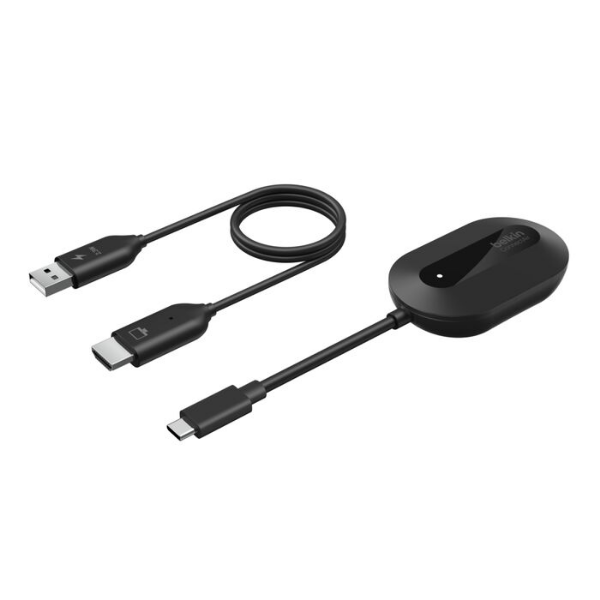
Best for: Cable-free screen sharing.
ConnectAir Wireless HDMI Display Adapter
- Plug-and-play with no WiFi, apps or drivers needed
- Mirror or extend your display in up to 1080p HD
- Long-range, low-latency performance for smooth streaming
| Feature | Streaming Stick | Wireless HDMI |
|---|---|---|
| Works on captive portal WiFi | No | N/A (no WiFi needed) |
| Works with locked-down hotel TVs | No | Yes |
| Requires app installation | Yes | No |
| Works with any USB-C laptop | No | Yes |
無線 HDMI 為旅客帶來的優勢
無線 HDMI 可以同時解決酒店電視鎖定和門戶認證的問題。某個製造商如此描述這個使用情況:「[無線 HDMI] 不同於部分仍仰賴在地 Wi‑Fi 或手機熱點的『無線』系統,其透過發射器與接收器之間的直接訊號傳輸運作。」
由於連線是完全獨立運作,因此無論酒店 Wi-Fi 是否需要驗證,或者電視軟件是否遭到鎖定,都不會造成影響。接收器只需連接至電視的 HDMI 連接埠,發射器再接上裝置,無線連線便可在不依賴其他基礎架構的情況下完成。
在產品說明中,「便攜性」常被列為賣點。一款無線 HDMI 套件的廣告寫道:「採用方便出行的設計:輕巧便攜,出差度假兩相宜。無需登入陌生電視,也可盡情觀看電影。」
最後提到的「無需登入陌生電視」這點,能引起重視安全性的旅客共鳴。酒店智能電視的安全措施通常並不嚴謹,在共用裝置上輸入串流登入資料會引發明顯的安全風險。
雙重用途:簡報與娛樂
一個製造商的營銷用語貼切描述了無線 HDMI :「經過一整天的簡報工作後,那個在工作上表現優異的便攜[裝置]搖身一變,化為出色的休閒娛樂夥伴。」
無線 HDMI 轉接器能勝任這種雙重角色。在辦公時間,它是能快速應對各式會議室配置的簡報裝置;而到了晚上,它還可以將酒店客房的電視轉化為手提電腦螢幕的延伸,盡享各種娛樂。對希望能盡量減少行李的人來說,一個能兼顧兩種用途的裝置,本身就具備相當的吸引力。
常見旅行情境
以下表格彙整了在商務旅遊過程中,經常會用到無線 HDMI 的情況:
| Scenario | The Problem | How Wireless HDMI Helps |
|---|---|---|
| Hotel room entertainment | TV inputs locked: captive portal WiFi blocks streaming sticks | Direct wireless connection required no network access |
| Client site presentation | Unknown equipment; wrong cables or adapters | Self-contained system works with any HDMI display |
| Extended stay or Airbnb | Unfamiliar TV setup; no access to streaming apps | Mirror your laptop with all your own content and accounts |
| Working from hotel room | Small laptop screen makes spreadsheets and documents hard to read | Use hotel TV as a second monitor for expanded workspace |
| International travel | Different plug types; voltage concerns with powered devices | USB powered from laptop or standard phone charger |
第三部分:技術問題與使用預期
用於簡報時,無線 HDMI 會有明顯延遲嗎?
在各大論壇與相關評論中,延遲問題常被提起。據研究,現代無線 HDMI 轉接器通常會產生約 50 到 100 毫秒的延遲。在簡報、播放影片或日常工作應用中,這種延遲幾乎無法察覺;對於講求影格時間準度的電競遊戲而言,這種延遲卻是難以接受。
有些產品標示宣稱「近乎零延遲」或「少於 0.01 秒」,但對於這類說法,最好抱持懷疑態度看待。無線影像在編碼、傳輸與解碼過程中,本身就會導致物理上的時間延遲。真正重要的不是延遲是否存在,而是它是否會影響您的實際使用情境;對於多數商務應用而言,答案通常是否定的。
解像度限制
大多數消費級與半專業級的無線 HDMI 轉接器,最高支援 1080p、60Hz 的輸出。部分產品雖支援 4K 輸入,但在傳輸過程中會降低解像度。若要達到真正的無線 4K 60Hz,那便需要所費不貲的專業裝置。
對於商務簡報而言,這個限制通常無足輕重。PowerPoint 投影片、試算表以及多數影片內容在 1080p 下皆有良好呈現效果,而且大多數會議室投影機本身的解像度也是 1080p。只有在專業影音製作或高階家庭娛樂等需求下,4K 的限制才會顯得重要,但這些並非便攜式無線 HDMI 轉接器的主要市場。
HDCP 與串流內容
對於計畫透過無線 HDMI 觀看串流服務的使用者而言,HDCP (高頻寬數位內容保護) 的兼容性是個值得重視的關鍵因素。Netflix、Amazon Prime Video、Disney Plus 等類似服務都會使用 HDCP 來防止未經授權的複製行為。當無線 HDMI 轉接器無法正確支援 HDCP 協定時,受保護的內容將只會顯示為黑畫面。
有一項產品標示明確提到這個限制:「YouTube、TikTok、Zoom 等未採用 HDCP 的影音應用程式,可在所有作業系統上使用;而 Netflix 和 Amazon Prime 等訂閱式 HDCP 影片應用程式只,僅支援 Windows 系統。」
如果想優先串流觀看受保護的內容,請在購買前確認產品是否與 HDCP 2.2 兼容,並使用您的特定裝置與服務進行測試。在這方面,低價轉接器通常表現較爲不足。
傳輸範圍與阻礙
一般無線 HDMI 系統宣稱,在沒有障礙物的情況下,傳輸範圍為 30 到 50 呎。然而,牆壁與其他遮擋物會顯著降低實際可用距離。就本文所討論的使用情境而言,特別是會議室和酒店客房,由於用戶通常會和顯示器處於同個房間內,因此傳輸範圍鮮少成為實際障礙。
若需要更長距離的應用情境,例如跨房間,或在大型場地中傳輸影像,則需要專為這類情境設計的不同 (也更昂貴的) 解決方案。
總結
綜合本篇研究內容可以看出,無線 HDMI 轉接器為兩類特定受眾提供了具體的解決方案:
對於企業用戶來說,這項產品解決會議開始時浪費時間整理連接線的困擾、為訪客簡報者簡化存取程序而不會產生安全疑慮,並改善專業會議空間的美觀問題。雖然早期的無線顯示體驗讓人對可靠性有所顧慮,但這項技術已足夠成熟,現代的硬件基本上已大幅解決了這些問題。
對於商務旅客來說,這項技術提供一種方法,讓他們可以實際使用酒店客房中被刻意鎖定的電視,而不必依靠酒店 WiFi 基礎設施,避免因此產生的各種問題。由於同一套裝置可用於簡報,也可用於個人娛樂中,這種雙重用途使其成為值得隨身攜帶的工具。
然而,無線 HDMI 不適合用於電競遊戲,它無法在高刷新率下提供真正的 4K 畫質;HDCP 兼容性不一,需要先行確認。不過對於主導多數購買決策的商務使用情況來說,這些限制不足以顯著抵銷產品帶來的價值。
其核心魅力在於操作簡單:只需插入兩個裝置就能互相連接,無需設定網絡、安裝軟件或排除兼容性問題。對任何曾在會議中看著他人手忙腳亂處理連接線的人來說,這樣的體驗本身無疑極具吸引力。
常見問題
可以,只要實體 HDMI 連接埠仍可輸入訊號,ConnectAir HDMI 無線顯示轉接器就能繞過電視的軟件限制。
不需要,ConnectAir HDMI 無線顯示轉接器採用 5GHz 的直接無線連線,無需依賴任何網絡。
可以,一個接收器最多可配對 8 個發射器。
延遲低於 80 毫秒,展示簡報、觀看影片與日常辦公均流暢無阻。
ConnectAir 是 Wi‑Fi Direct 的專有衍生技術,具備連結層加密功能,適用於房間範圍內或近距離的畫面鏡像傳輸。