Key Features and Benefits
- Easy integration and operation
- Plug and Play – Simply connect both ends and start the display
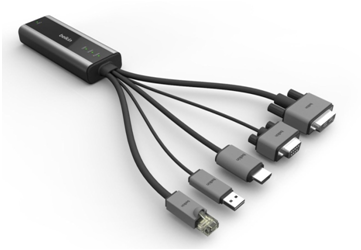
- Easy connectivity with standard DVI-D and HDMI connectors and power over USB on TX side
- Clear LED visual indicators
- High quality video
- No compression – No loss of video quality from compression and decompression
- No latency – Less than one (1) frame latency, ideal for defense and financial market applications
- No dropped frames – All frames in video stream reach the display
- No color or motion distortion – Video maintains its rich color and full motion
- HD Quality (1920 x 1200 x 60 Hz) to a distance of up to 1K from the display.
- High quality audio
- HD audio in HDMI signal (F1DN002X only)
- Full EDID and HDCP support
- Compatible with all EDID and HDCP displays and devices
- 10/100 Base-T Ethernet
- Connecting guest laptops in conference rooms
- Connecting VoIP phones in call centers and trading rooms
- Connecting a network printer near the display
-
Small and efficient
- Green product – Lowest power requirement of all similar devices
- Smallest form factor of all similar devices
-
IR control
- Control matrix billboards, projectors and other difficult to reach displays
- Control conference room displays
| Supports | Model | ||
| F1DN001X | F1DN002X | F1DN003X | |
| DVI-D | ● | ● | |
| Serial | ● | ● | |
| IR | ● | ● | |
| HDMI | ● | ||
| Ethernet 10/100 Mbps | ● | ● | |
| USB KB and Mouse | ● | ||
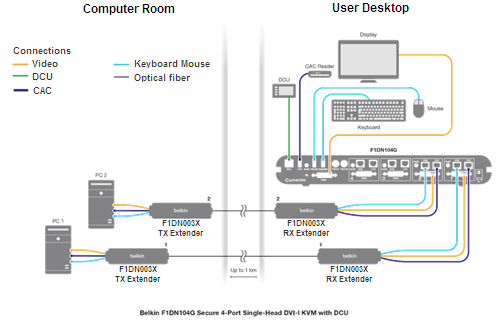
Typical setup for the Belkin Fiber Extender
Setup 1 – KVM at Desk Side