Premium accessories for iPhone 18. Shop now.


Thunderbolt Docks
Find the best Thunderbolt dock for your Mac, PC, or Chromebook. Build a work or home station with a Thunderbolt 5 or Thunderbolt 4 dock: add up to three displays, wired Ethernet, drives, and peripherals at up to 80Gbps, with fast charging over one cable.


- Best Seller
- Featured
- Newest
- Price Low to High
- Price High to Low
https://www.belkin.com/uk/products/docks-hubs/thunderbolt-docks/?start=0&sz=12
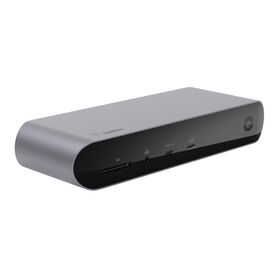


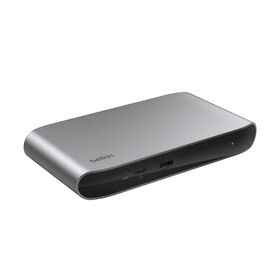
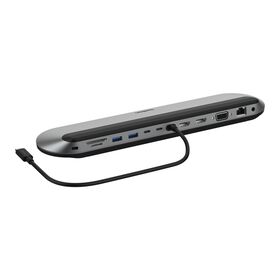

Compare Belkin Thunderbolt Docks
Thunderbolt gives you the most bandwidth Belkin makes, for the fastest displays, storage, and wired networking over one cable. Compare the Thunderbolt 5 and Thunderbolt 4 range by speed, ports, display support, and charging.
| Product | Thunderbolt | Ports | Video Out | Power & Best For |
|---|---|---|---|---|
| Connect Thunderbolt 5 Dock | Thunderbolt 5, up to 80Gbps (120Gbps Bandwidth Boost) | 14 ports: Thunderbolt 5, USB-C, USB-A, HDMI, 2.5Gb Ethernet | Triple 4K at 144Hz or 8K at 60Hz | Up to 140W PD. Fastest desk: triple display, 2.5Gb Ethernet, and daisy-chaining |
| Pro Thunderbolt 4 Dock | Thunderbolt 4, up to 40Gbps | Multiport: 2x Thunderbolt 4, USB-C, USB-A, Gigabit Ethernet, SD, 3.5mm audio | Single 8K at 30Hz, dual 4K at 60Hz, triple on compatible laptops | Up to 90W PD. Full-featured TB4 desk dock with Ethernet and card reader |
| Thunderbolt 4 5-in-1 Core Hub | Thunderbolt 4, up to 40Gbps | 5 ports: 4x Thunderbolt 4, USB-A | Dual 4K at 60Hz or single 8K | Up to 96W PD. Compact core hub for the highest-bandwidth displays and 40Gbps storage |
Thunderbolt Docks: Your Questions Answered
A Thunderbolt dock is a device that expands the connectivity of your Thunderbolt or USB-C-enabled device by providing additional ports for peripherals like monitors, external drives, and other accessories. Thunderbolt dock is compatible with Windows and Mac, and connects to your device via Thunderbolt or USB-C cable.
A Thunderbolt dock expands the connectivity of your USB-C or Thunderbolt enabled device, allowing you to connect peripherals such as monitors, external drives, keyboards. These docks also deliver more power to charge your connected devices, offer faster data transfer speeds of up to 40Gbps, and can even support daisy chaining (connecting another Thunderbolt hub/dock) to connect up to six additional devices, all through a single Thunderbolt connection. Thunderbolt docks are compatible with Windows and Mac devices.
You may benefit from a Thunderbolt dock if you require additional ports that provide more power and charge to your devices and peripherals, higher data transfer speeds of up to 40Gbps, and more versatility and efficiency than a USB dock/hub, all through a single Thunderbolt cable connection.
Some Thunderbolt docks support power delivery and can charge compatible laptops through the Thunderbolt and/or USB-C connection, but not all docks offer this feature. Check the specifications of the dock to confirm if it supports charging.
Thunderbolt and USB-C are not the same, but Thunderbolt 3 and 4 use the USB-C connector. Thunderbolt is a high-speed interface technology developed by Intel, while USB-C is a connector standard developed by the USB Implementers Forum. All Belkin Thunderbolt products are Intel certified.
Yes, Thunderbolt docks are backward compatible with USB-C devices, but USB-C docks may not support Thunderbolt speeds or features. Thunderbolt 2 and 1 docks will require a USB-C adapter.
A Thunderbolt 3 dock is a docking station that uses Thunderbolt 3 technology to provide high-speed data transfer, power delivery, and connectivity options for compatible devices. Thunderbolt 3 shares the same port as USB-C.
Thunderbolt 3 technology is compatible with earlier versions like Thunderbolt 2, but will require a physical adapter to accommodate the different connector types and protocols.
Yes, Thunderbolt 4 docks are backward compatible with Thunderbolt 3 ports, but will limit the capabilities of the Thunderbolt 4 dock to Thunderbolt 3 specs.
Yes, Thunderbolt 4 docks can be used with earlier versions, but will limit the capabilities of the Thunderbolt 4 dock to their respective specs, and Thunderbolt 2 and 1 will require a physical adapter to accommodate their connector types and protocols.
Yes, Thunderbolt docks are compatible with Mac computers that have Thunderbolt or USB-C ports.
A Thunderbolt dock is a device that expands the connectivity of your Thunderbolt or USB-C-enabled device by providing additional ports for peripherals like monitors, external drives, and other accessories. Thunderbolt dock is compatible with Windows and Mac, and connects to your device via Thunderbolt or USB-C cable.

Welcome. Would you like to be redirected to the Belkin US website?
United States